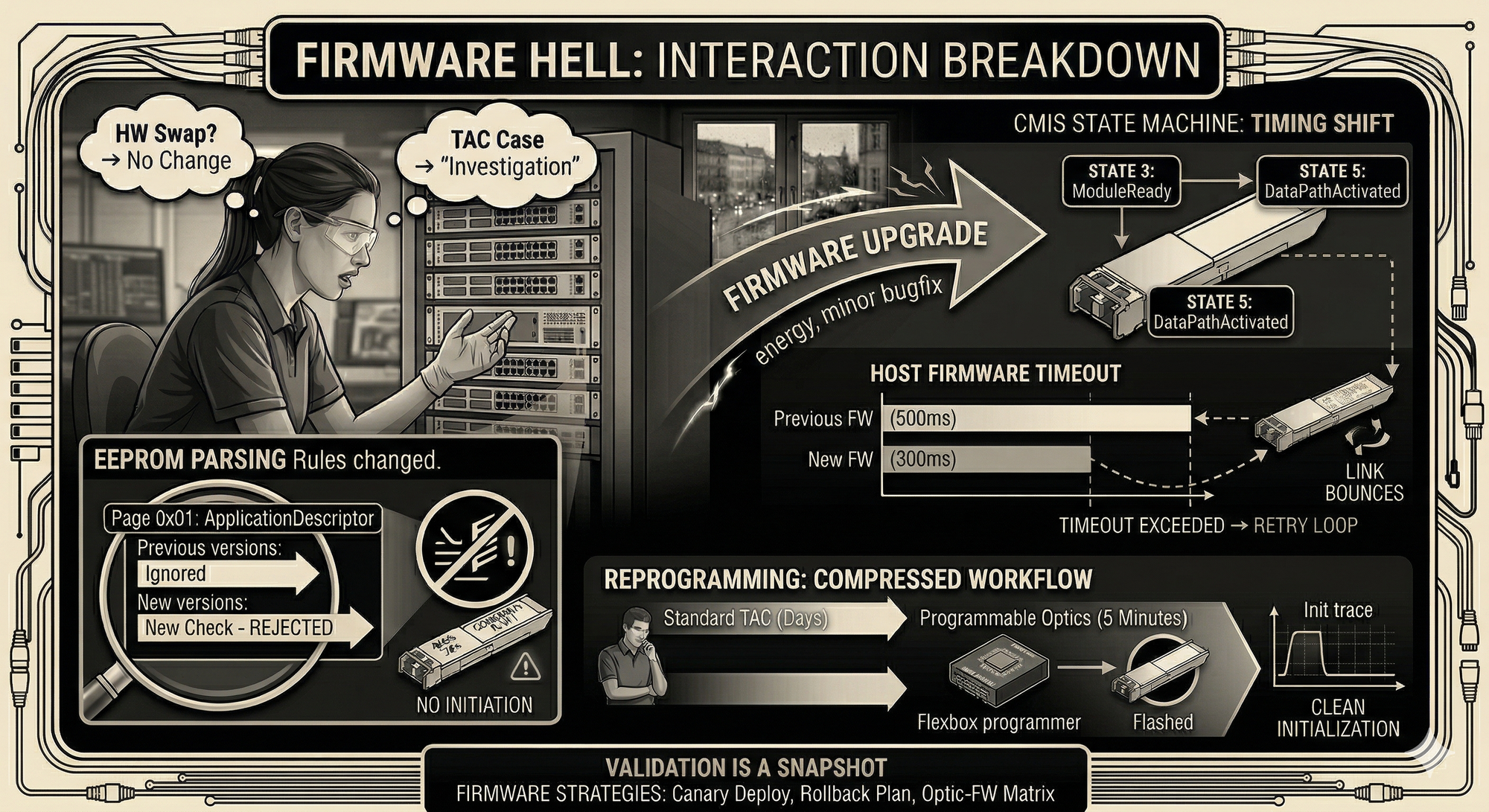
Firmware Hell — Why Your Optics Break After Upgrade
A system runs stable for months, then starts showing intermittent link resets after a routine update. Nothing is technically broken. The system behavior has changed.
The links have been stable for months. You apply a firmware update. Two hours later, ports start resetting.
Nobody changed the optics. Nobody touched the fiber. The platform vendor labeled this release "minor bugfix."
A set of 400G links ran clean since deployment. After a firmware upgrade, several ports began cycling. Links came up, trained, passed basic checks, then dropped and reinitialized. Sometimes after minutes, sometimes after hours.
Port migrations 2 hours — no change
Fiber/connector check 1.5 hours — clean
Vendor TAC case 3 days — "under investigation"
FW version diff 30 minutes — root cause found
The first instinct is always hardware. Swap the optic, move the port, check the patch. When you've burned a full day on that, someone finally diffs the firmware changelog and finds a timing change in DSP initialization.
Every modern pluggable follows the CMIS state machine. If you're debugging firmware issues without understanding it, you're guessing.
State 2 ModulePwrUp — host requests full power-up
State 3 ModuleReady — DSP initialized, laser off
State 4 DataPathInit — host configures lanes, picks application
State 5 DataPathActivated — laser on, traffic flows
Transition timing Host-controlled — firmware dictates the pace
Spec CMIS 5.2, Section 6.3.2
Between ModuleReady and DataPathActivated, the host writes config to EEPROM pages: application selection, lane assignments, power settings. Different firmware versions run different timing tolerances for these transitions.
A version that waited 500ms for DataPathInit gets replaced by one that waits 300ms. Most optics handle the shorter window fine. Modules with slower DSPs or particular initialization quirks hit a retry loop. The link bounces.
The optics are within spec. The platform is within spec. The interaction between them breaks because a timeout moved.
Same topology. Same optics. Different outcome.
The only thing that changed was the firmware — and suddenly, modules that had been running fine for months started failing during initialization.
This wasn’t a signal issue. It wasn’t power. It wasn’t optics quality.
It was interpretation.
Capabilities: advertised applications, supported speeds
Runtime state: active application, lane mapping
The new firmware started reading deeper into the EEPROM — specifically Page 0x01.
That’s where the ApplicationDescriptor lives. This is the part that tells the host what the module actually is: which electrical interface it expects, how lanes are mapped, what media type it represents.
Older firmware didn’t look at it. Or at least not strictly.
This version did.
And just like that, optics that were “working” yesterday were no longer considered valid.
Nothing broke.
The rules changed.
Standard troubleshooting for firmware-optic issues is slow. Swap modules, open TAC cases, wait for vendor analysis. That cycle runs days to weeks.
Programmable optics compress it to minutes.
Step 2 Insert into Flexbox programmer
Step 3 Select target vendor profile or custom EEPROM map
Step 4 Flash — 30 to 90 seconds
Step 5 Re-insert, verify init sequence
Total ~5 minutes vs. days of TAC ping-pong
You reprogram the module with an adjusted vendor profile or EEPROM map. Insert it. Watch the CMIS state transitions. If it initializes clean, the problem was compatibility handling. If it still fails, you're looking at a physical issue. Either way, you know in five minutes instead of five days.
Validation is a snapshot. It captures one firmware version, one optic revision, one platform state. All three change independently.
Canary deploy Upgrade one node, observe 7 days
Optic-FW matrix Track every optic/FW combo that's been tested
Pre-upgrade lab pass Run every optic type on new FW before rollout
Rollback plan Required. Not optional.
Pin your firmware through deployment windows. Run canary upgrades on a single node and watch for a week. Keep a matrix of which optic models have been tested on which firmware versions. And always have a rollback plan, because the release labeled "minor bugfix" is the one that will cost you a weekend.